Simple Authoritative Server Part 2

This is part 2 of the authoritative server. In this example the client will tell the server where it wants to go (up, down, left, right), and the server in turn tells the client where its position is.
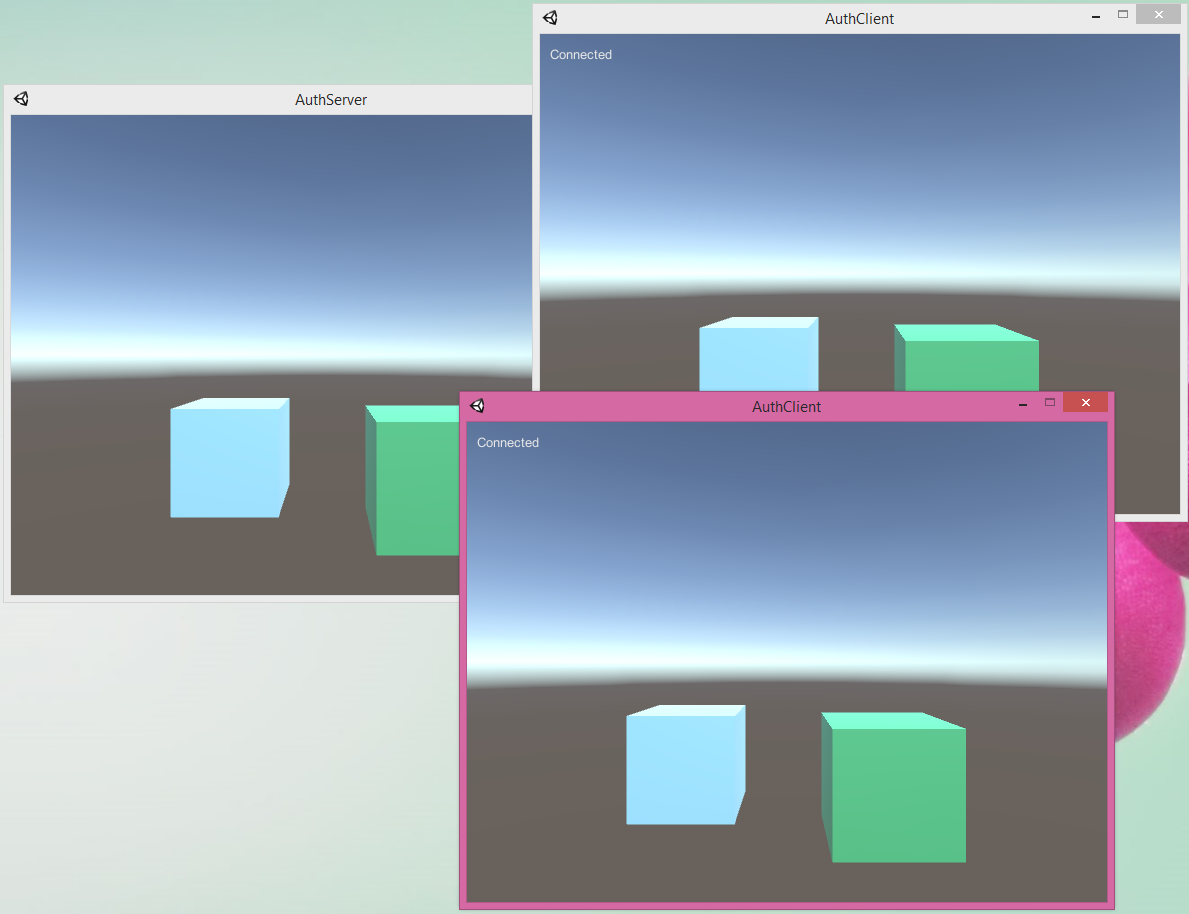
clientinput

This is written using Unity’s NetworkTransport API.

First the server will create itself and set up a routine to send out client position information every tenth of a second.

void Start()
{
    Application.runInBackground = true;
    NetworkTransport.Init();

    ConnectionConfig config = new ConnectionConfig();
    reliableChannel = config.AddChannel(QosType.Reliable);
    HostTopology topology = new HostTopology(config, 5);
#if UNITY_EDITOR
    // Listen on port 25000
    m_hostId = NetworkTransport.AddHostWithSimulator(topology, 200, 400, 25000);
#else
    m_hostId = NetworkTransport.AddHost(topology, 25000);
#endif

    // Send client position data every so often to those connected
    StartCoroutine(SendPositionCoroutine());
}

Here is how we send out each clients’ position as calculated by Unity’s physics engine. clientList is a list we keep of all clients that are connected to us and which GameObject is theirs. We send the server GameObject’s GetInstanceID() so that the clients will know who we’re talking about. Note we include the PacketTypeEnum as the first byte so that the client will know if this is a “position of all clients” packet or about the clients that are connected (name, color).

enum PacketTypeEnum
{
    Unknown = (1 << 0),
    Position = (1 << 1),
    Information = (1 << 2)
}

// Send client position data every so often to those connected
IEnumerator SendPositionCoroutine()
{
    NetworkWriter nr = new NetworkWriter();

    while (true)
    {
        yield return new WaitForSeconds(0.1f);

        // Anything to do?
        if (clientList.Count == 0)
            continue;

        // Reset stream
        nr.SeekZero();

        nr.Write((byte)PacketTypeEnum.Position);
        foreach (var item in clientList)
        {
            nr.Write(item.obj.GetInstanceID());
            nr.Write(item.obj.transform.position);

            // Don't pack too much
            // Fix me! Send more than one packet instead
            if (nr.Position > 1300)
                break;
        }

        // Send data out
        byte[] buffer = nr.ToArray();
        byte error;
        //Debug.Log(string.Format("Sending data size {0}", buffer.Length));
        foreach (var item in clientList)
        {
            NetworkTransport.Send(m_hostId, item.connectionId, reliableChannel, buffer, buffer.Length, out error);
        }
    }
}

Then the server has an Update routine where it listens for incoming traffic. It will create a GameObject when clients connect, remove one when they disconnect, and process client input here.

void Update()
{
    // Remember who's connecting and disconnecting to us
    if (m_hostId == -1)
        return;
    int connectionId;
    int channelId;
    int receivedSize;
    byte error;
    byte[] buffer = new byte[1500];
    NetworkEventType networkEvent = NetworkTransport.ReceiveFromHost(m_hostId, out connectionId, out channelId, buffer, buffer.Length, out receivedSize, out error);
    switch (networkEvent)
    {
        case NetworkEventType.Nothing:
            break;
        case NetworkEventType.ConnectEvent:
            ClientConnected(connectionId);
            break;
        case NetworkEventType.DisconnectEvent:
            ClientData cd = clientList.FirstOrDefault(item => item.connectionId == connectionId);
            if (cd != null)
            {
                Destroy(cd.obj);
                clientList.Remove(cd);
                Debug.Log("Client disconnected");
                // Send all clients new info
                SendClientInformation();
            }
            else
            {
                Debug.Log("Client disconnected that we didn't know about!?");
            }
            break;
        case NetworkEventType.DataEvent:
            //Debug.Log(string.Format("Got data size {0}", receivedSize));
            Array.Resize(ref buffer, receivedSize);
            ProcessClientInput(connectionId, buffer);
            break;
    }
}

To process client input we do this.

enum InputTypeEnum
{
    KeyNone = (1 << 0),
    KeyUp = (1 << 1),
    KeyDown = (1 << 2),
    KeyLeft = (1 << 3),
    KeyRight = (1 << 4),
    KeyJump = (1 << 5)
}

void ProcessClientInput(int connectionId, byte[] buffer)
{
    ClientData cd = clientList.FirstOrDefault(item => item.connectionId == connectionId);
    if (cd == null)
    {
        Debug.Log("Client that we didn't know about!?");
        return;
    }

    InputTypeEnum input = (InputTypeEnum)buffer[0];
    float deltaX = 0.0f;
    float deltaZ = 0.0f;
    if ((input & InputTypeEnum.KeyUp) == InputTypeEnum.KeyUp)
        deltaX = 1.0f;
    if ((input & InputTypeEnum.KeyDown) == InputTypeEnum.KeyDown)
        deltaX = -1.0f;
    if ((input & InputTypeEnum.KeyRight) == InputTypeEnum.KeyRight)
        deltaZ = 1.0f;
    if ((input & InputTypeEnum.KeyLeft) == InputTypeEnum.KeyLeft)
        deltaZ = -1.0f;
    Vector3 movement = new Vector3(deltaX, 0, deltaZ);
    movement = transform.TransformDirection(movement);
    movement *= 10.0f;
    cd.obj.GetComponent<CharacterController>().Move(movement * Time.deltaTime);
}

On the client side, our Update script will look like this:

void Update()
{
    if (m_hostId == -1)
        return;
    int connectionId;
    int channelId;
    int receivedSize;
    byte error;
    byte[] buffer = new byte[1500];
    NetworkEventType networkEvent = NetworkTransport.ReceiveFromHost(m_hostId, out connectionId, out channelId, buffer, buffer.Length, out receivedSize, out error);
    switch (networkEvent)
    {
        case NetworkEventType.Nothing:
            break;
        case NetworkEventType.ConnectEvent:
            m_serverConnectionId = connectionId;
            break;
        case NetworkEventType.DisconnectEvent:
            m_serverConnectionId = -1;
            break;
        case NetworkEventType.DataEvent:
            if (connectionId != m_serverConnectionId)
            {
                Debug.Log("Data not from server!?");
            }
            else
            {
                Array.Resize(ref buffer, receivedSize);
                ProcessServerData(buffer);
            }
            break;
    }
}

The client’s ProcessServerData is a big routine where we process PacketTypeEnum.Position:

class PositionData
{
    public int objectId;
    public Vector3 pos;
}

NetworkReader nr = new NetworkReader(buffer);
List<PositionData> posList = new List<PositionData>();
PositionData p;
while (nr.Position != buffer.Length)
{
    p = new PositionData();
    p.objectId = nr.ReadInt32();
    p.pos = nr.ReadVector3();
    posList.Add(p);
}

// Update game objects
foreach (var item in clientList)
{
    if (item.obj == null)
        continue;
    p = posList.FirstOrDefault(x => x.objectId == item.objectId);
    if (p == null)
        Debug.Log("Cannot find game object");
    else
        item.obj.transform.position = p.pos;
}

…we also process PacketTypeEnum.Information which is sent out from the server whenever a client connects or disconnects:

class InformationData
{
    public int objectId;
    public string name;
    public Vector3 pos;
    public float r;
    public float g;
    public float b;
}

NetworkReader nr = new NetworkReader(buffer);
List<InformationData> infoList = new List<InformationData>();
InformationData info;
while (nr.Position != buffer.Length)
{
    info = new InformationData();
    info.objectId = nr.ReadInt32();
    info.name = nr.ReadString();
    info.pos = nr.ReadVector3();
    info.r = nr.ReadSingle();
    info.g = nr.ReadSingle();
    info.b = nr.ReadSingle();
    infoList.Add(info);
}

// Remove clients that aren't listed
foreach (var item in clientList)
{
    if (item.obj == null)
        continue;
    info = infoList.FirstOrDefault(x => x.objectId == item.objectId);
    if (info == null)
        Destroy(item.obj);
}
clientList.RemoveAll(x => x.obj == null); // Note items are set to null only after Update!

foreach (var item in infoList)
{
    ClientData cd = clientList.FirstOrDefault(x => x.objectId == item.objectId);
    // Is this new client info?
    if (cd == null)
    {
        // Create new object
        GameObject obj = GameObject.CreatePrimitive(PrimitiveType.Cube);
        // No CharacterController here!
        // Set position
        obj.transform.position = item.pos;
        // Set color
        obj.GetComponent<Renderer>().material.color = new Color(item.r, item.g, item.b);

        cd = new ClientData();
        cd.objectId = item.objectId;
        cd.name = item.name;
        cd.obj = obj;
        clientList.Add(cd);
        Debug.Log(string.Format("New client info for {0}", cd.name));
    }
}

The client runs a coroutine where it sends input information every tenth of a second:

// Send input data every so often
IEnumerator SendInputCoroutine()
{
    while (true)
    {
        yield return new WaitForSeconds(0.1f);

        // Anything to do?
        if (m_hostId == -1 || m_serverConnectionId == -1)
            continue;

        InputTypeEnum input = InputTypeEnum.KeyNone;
        float f;
        f = Input.GetAxis("Horizontal");
        if (f > 0.0f)
            input |= InputTypeEnum.KeyUp;
        if (f < 0.0f)
            input |= InputTypeEnum.KeyDown;
        f = Input.GetAxis("Vertical");
        if (f > 0.0f)
            input |= InputTypeEnum.KeyRight;
        if (f < 0.0f)
            input |= InputTypeEnum.KeyLeft;
        if (Input.GetKey(KeyCode.Space))
            input |= InputTypeEnum.KeyJump;

        if (input == InputTypeEnum.KeyNone)
            continue;

        // Send data out
        byte[] buffer = new byte[1];
        buffer[0] = (byte)input;
        byte error;
        NetworkTransport.Send(m_hostId, m_serverConnectionId, reliableChannel, buffer, buffer.Length, out error);
    }
}

That’s basically it! We are still not doing interpolation which is needed. But I think this is a good start.

The two main scripts are Server.cs and Client.cs.

Both projects at GitHub
Simple Authoritative Server Part 1

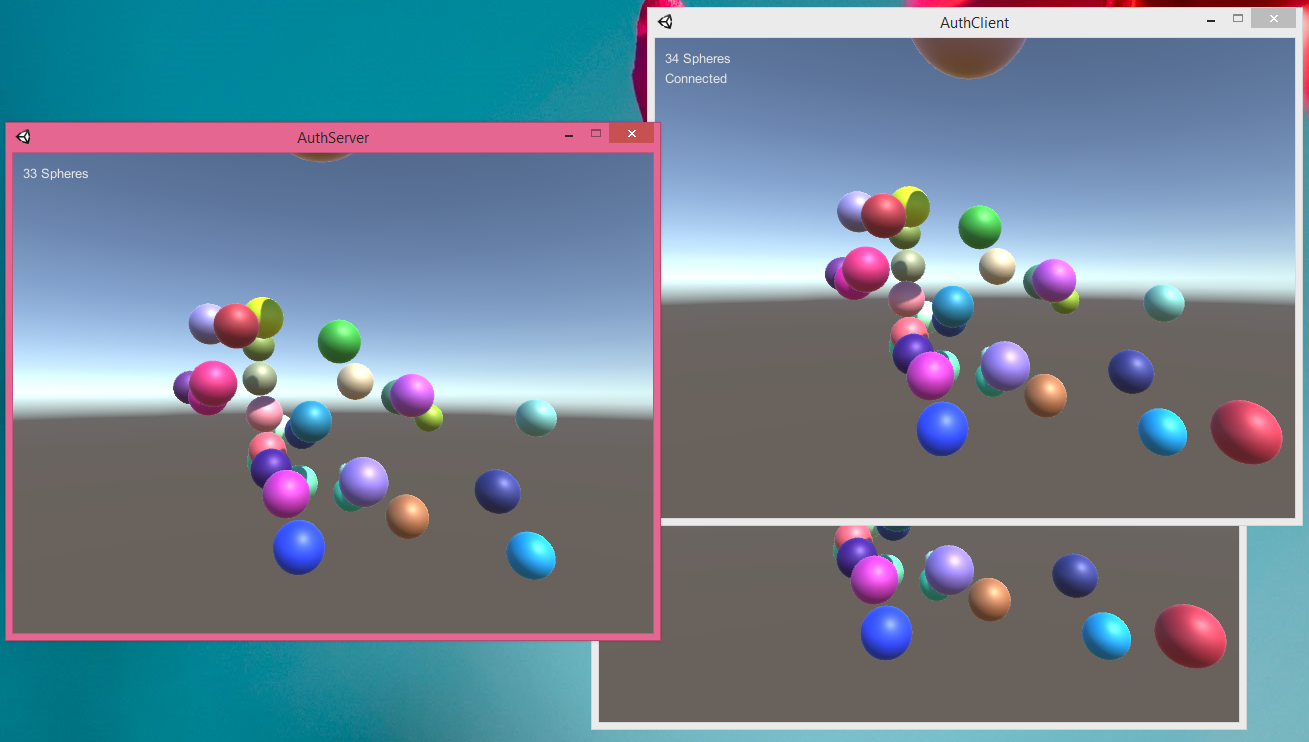
An authoritative server in my mind is where the clients send their key presses to the server, and the server tells the clients where their character is located. This example here is kind of like a “Hello World”, or rather just a “Hello”, if that, because I don’t have the clients sending anything to the server. The server will generate spheres and then send the sphere positions to any clients connected and the clients display the spheres for the user. Here you can see a server with two clients connected.

authservertwoclients

Now keep in mind I have no professional experience doing any of this and I don’t even know if this is the correct approach to take, but I’ve found very few examples of this kind of thing on the Internet (using Unity’s NetworkTransport). If you don’t know about NetworkTransport, read Checking out Unity’s NetworkTransport first. This does not use Unity’s High Level API because I wanted to have as much control as possible over what was sent on the network.

Let’s start. So let’s have the server spawn a sphere and add it to a list so we can keep track of everything:

IEnumerator SpawnCoroutine()
{
    // Create new object
    GameObject sphere = GameObject.CreatePrimitive(PrimitiveType.Sphere);
    sphere.AddComponent<Rigidbody>();
    //sphere.GetComponent<Rigidbody>().velocity = new Vector3(UnityEngine.Random.Range(-1.0f, 1.0f), UnityEngine.Random.Range(-1.0f, 1.0f), UnityEngine.Random.Range(-1.0f, 1.0f));
    // Set position
    sphere.transform.position = new Vector3(UnityEngine.Random.Range(-2.0f, 2.0f), UnityEngine.Random.Range(-2.0f, 2.0f), UnityEngine.Random.Range(-2.0f, 2.0f));
    // Set color
    sphere.GetComponent<Renderer>().material.color = new Color(UnityEngine.Random.value, UnityEngine.Random.value, UnityEngine.Random.value);

    // Save data for when we send across the net
    sphereList.Add(sphere);
    yield return new WaitForSeconds(5.0f);

    sphereList.Remove(sphere);
    Destroy(sphere);
}

Now we need another coroutine that runs every tenth of a second and sends the sphere list out to every connected client. A major complication is turning a List into a byte stream. Let’s first serialize the data:

// Serialize list
NetworkWriter nw = new NetworkWriter();
Renderer rend;

foreach (var item in sphereList)
{
    nw.Write(item.GetInstanceID());
    nw.Write(item.transform.position);
    rend = item.GetComponent<Renderer>();
    nw.Write(rend.material.color.r);
    nw.Write(rend.material.color.g);
    nw.Write(rend.material.color.b);

    // Don't pack too much
    // Fix me! Send more than one packet instead
    if (nw.Position > 1300)
        break;
}

// Send data out
byte[] buffer = nw.ToArray();
byte error;
//Debug.Log(string.Format("Sending data size {0}", buffer.Length));
foreach (var item in connectList)
{
    NetworkTransport.Send(m_hostId, item, reliableChannel, buffer, buffer.Length, out error);
}

One shortcoming in this example is the server only sends the first 50 or so spheres out. We’d need to send more than one packet if we wanted more. NetworkTransport message size is limited as it’s UDP. I wrote the client so that it can handle different packets of spheres though. I’m going to use the GetInstanceID as a “primary key” for each sphere so we know if a client has the sphere yet or not.

Now here’s how the client will deserialize:

struct NetworkData
{
    public int id;
    public Vector3 pos;
    public float r;
    public float g;
    public float b;
}

NetworkReader nr = new NetworkReader(buffer);

List<NetworkData> tmpList = new List<NetworkData>();
NetworkData tmpData;

// Read to the end
while (nr.Position != buffer.Length)
{
    // Deserialize
    tmpData.id = nr.ReadInt32();
    tmpData.pos = nr.ReadVector3();
    tmpData.r = nr.ReadSingle();
    tmpData.g = nr.ReadSingle();
    tmpData.b = nr.ReadSingle();
    tmpList.Add(tmpData);
}

How does the client then turn this list into game objects? It remembers what game objects it’s already spawned.

class SphereData
{
    public int id;
    public float lastUpdate;
    public GameObject obj;
}
// Remeber all spheres we spawned
List<SphereData> sphereList = new List<SphereData>();

Now we just take the List we deserialized earlier on the client and turn it into new spheres if we don’t have the game object already, or update the old sphere’s position:

SphereData sd;
foreach (var networkData in tmpList)
{
    sd = sphereList.FirstOrDefault(item => item.id == networkData.id);
    // Do we have this sphere already?
    if (sd != null)
    {
        // Update position
        sd.obj.transform.position = networkData.pos;
        sd.lastUpdate = Time.realtimeSinceStartup;
    }
    else
    {
        // Create new object
        GameObject sphere = GameObject.CreatePrimitive(PrimitiveType.Sphere);
        // No rigidbody here!
        // Set position
        sphere.transform.position = networkData.pos;
        // Set color
        sphere.GetComponent<Renderer>().material.color = new Color(networkData.r, networkData.g, networkData.b);

        sd = new SphereData();
        sd.id = networkData.id;
        sd.obj = sphere;
        sd.lastUpdate = Time.realtimeSinceStartup;
        sphereList.Add(sd);
    }
}

The client will delete spheres it hasn’t gotten info from the server about if enough time passes.

void CleanupSpheres()
{
    foreach (var item in sphereList)
    {
        // Haven't heard about sphere in a while so destroy it
        if (item.obj.gameObject != null && item.lastUpdate + 1.0f < Time.realtimeSinceStartup)
            Destroy(item.obj.gameObject); // Note this becomes null only after Update
    }
}

So there are two main scripts, Server.cs and Client.cs. I attach these to a Main Camera in their own separate projects.

Note you need to add a Sphere to the scene, but you can turn off the Sphere Collider and Mesh Renderer. This is to make it so Unity builds with the correct shaders needed for when you do spawn the spheres. Otherwise you will see pink spheres!

Also note pressing space on the server will cause a lot of Spheres to be generated.

In the future I hope to figure out a way to send more than 50 spheres to the clients, to get some interpolation going (a la what Gabriel Gambetta talks about), and eventually have clients moving the spheres around with them sending input. (It is also better to have the server send the sphere colors only once when they are created and not on each update!)

Both projects at GitHub

Checking out Unity’s NetworkTransport

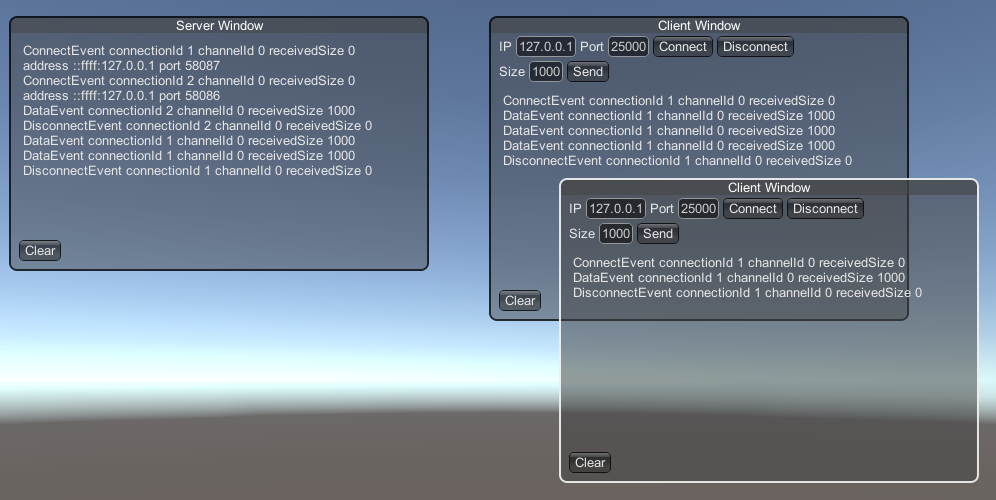
I wrote up some code to help me understand Unity’s Transport Layer API. I created a “client” script and a “server” script. I then attached these two scripts to a Main Camera and hit Play. If you want, you can attach more than one “client” script.

llapichat

When the client connects, I can choose how big of a message to send. When the server receives a message, it then echoes it back to everyone who’s connected.

When you call AddHost, I think it’s spawning a thread that then listens to and sends on the port.

Here is my “ClientUI.cs”:

using UnityEngine;
using UnityEngine.Networking;

public class ClientUI : MonoBehaviour
{
    public void Start()
    {
        NetworkTransport.Init();

        ConnectionConfig config = new ConnectionConfig();
        reliableChannel = config.AddChannel(QosType.Reliable);
        HostTopology topology = new HostTopology(config, 1); // Only connect once
        // Do not put port since we are a client and want to take any port available to us
#if UNITY_EDITOR
        m_hostId = NetworkTransport.AddHostWithSimulator(topology, 200, 400);
#else
        m_hostId = NetworkTransport.AddHost(topology);
#endif
    }

    Rect windowRect = new Rect(500, 20, 100, 50);
    string ipField = System.Net.IPAddress.Loopback.ToString();
    string portField = "25000";
    byte reliableChannel;
    int m_hostId = -1;
    int m_connectionId;
    Vector2 scrollPos;
    string sizeField = "1000";
    string receiveLabel;
    public void OnGUI()
    {
        windowRect = GUILayout.Window(GetInstanceID(), windowRect, MyWindow, "Client Window");
    }

    void MyWindow(int id)
    {
        GUILayout.BeginHorizontal();
        GUILayout.Label("IP");
        ipField = GUILayout.TextField(ipField);
        GUILayout.Label("Port");
        portField = GUILayout.TextField(portField);
        if (GUILayout.Button("Connect"))
        {
            byte error;
            int connectionId;
            connectionId = NetworkTransport.Connect(m_hostId, ipField, int.Parse(portField), 0, out error);
            if (connectionId != 0) // Could go over total connect count
                m_connectionId = connectionId;
        }
        if (GUILayout.Button("Disconnect"))
        {
            byte error;
            bool ret = NetworkTransport.Disconnect(m_hostId, m_connectionId, out error);
            print("Disconnect " + ret + " error " + error);
        }
        GUILayout.FlexibleSpace();
        GUILayout.EndHorizontal();

        GUILayout.BeginHorizontal();
        GUILayout.Label("Size");
        sizeField = GUILayout.TextField(sizeField);
        if (GUILayout.Button("Send"))
        {
            byte error;
            byte[] buffer = new byte[int.Parse(sizeField)];
            // Just send junk
            bool ret = NetworkTransport.Send(m_hostId, m_connectionId, reliableChannel, buffer, buffer.Length, out error);
            print("Send " + ret + " error " + error);
        }
        GUILayout.FlexibleSpace();
        GUILayout.EndHorizontal();

        scrollPos = GUILayout.BeginScrollView(scrollPos, GUILayout.Height(200.0f), GUILayout.Width(400.0f));
        GUILayout.Label(receiveLabel);
        GUILayout.EndScrollView();

        GUILayout.BeginHorizontal();
        if (GUILayout.Button("Clear"))
        {
            receiveLabel = "";
        }
        GUILayout.FlexibleSpace();
        GUILayout.EndHorizontal();

        GUI.DragWindow();
    }

    public void Update()
    {
        if (m_hostId == -1)
            return;
        int connectionId;
        int channelId;
        byte[] buffer = new byte[1500];
        int receivedSize;
        byte error;
        NetworkEventType networkEvent = NetworkTransport.ReceiveFromHost(m_hostId, out connectionId, out channelId, buffer, 1500, out receivedSize, out error);
        if (networkEvent == NetworkEventType.Nothing)
            return;
        receiveLabel += string.Format("{0} connectionId {1} channelId {2} receivedSize {3}\n", networkEvent.ToString(), connectionId, channelId, receivedSize);
    }
}

My “ServerUI.cs”:

using UnityEngine;
using UnityEngine.Networking;
using System.Collections.Generic;
using System.Net;

public class ServerUI : MonoBehaviour
{
    public void Start()
    {
        NetworkTransport.Init();

        ConnectionConfig config = new ConnectionConfig();
        reliableChannel = config.AddChannel(QosType.Reliable);
        HostTopology topology = new HostTopology(config, 5); // Allow five connections
#if UNITY_EDITOR
        m_hostId = NetworkTransport.AddHostWithSimulator(topology, 200, 400, 25000);
#else
        m_hostId = NetworkTransport.AddHost(topology, 25000);
#endif
    }

    Rect windowRect = new Rect(20, 20, 100, 50);
    Dictionary<int, IPEndPoint> connectionDictionary = new Dictionary<int, IPEndPoint>();

    byte reliableChannel;
    int m_hostId = -1;
    Vector2 scrollPos;
    string receiveLabel;
    public void OnGUI()
    {
        windowRect = GUILayout.Window(GetInstanceID(), windowRect, MyWindow, "Server Window");
    }

    void MyWindow(int id)
    {
        scrollPos = GUILayout.BeginScrollView(scrollPos, GUILayout.Height(200.0f), GUILayout.Width(400.0f));
        GUILayout.Label(receiveLabel);
        GUILayout.EndScrollView();

        GUILayout.BeginHorizontal();
        if (GUILayout.Button("Clear"))
        {
            receiveLabel = "";
        }
        GUILayout.FlexibleSpace();
        GUILayout.EndHorizontal();

        GUI.DragWindow();
    }

    public void Update()
    {
        if (m_hostId == -1)
            return;
        int connectionId;
        int channelId;
        byte[] buffer = new byte[1500];
        int receivedSize;
        byte error;
        NetworkEventType networkEvent = NetworkTransport.ReceiveFromHost(m_hostId, out connectionId, out channelId, buffer, 1500, out receivedSize, out error);
        if (networkEvent == NetworkEventType.Nothing)
            return;
        receiveLabel += string.Format("{0} connectionId {1} channelId {2} receivedSize {3}\n", networkEvent.ToString(), connectionId, channelId, receivedSize);
        // If someone connected then save this info
        if (networkEvent == NetworkEventType.ConnectEvent)
        {
            string address;
            int port;
            UnityEngine.Networking.Types.NetworkID network;
            UnityEngine.Networking.Types.NodeID dstNode;
            NetworkTransport.GetConnectionInfo(m_hostId, connectionId, out address, out port, out network, out dstNode, out error);
            receiveLabel += string.Format("address {0} port {1}\n", address, port);
            connectionDictionary.Add(connectionId, new IPEndPoint(IPAddress.Parse(address), port));
        }
        else if (networkEvent == NetworkEventType.DisconnectEvent) // Remove from connection list
        {
            connectionDictionary.Remove(connectionId);
        }
        else if (networkEvent == NetworkEventType.DataEvent)
        {
            // Echo to everyone what we just received
            foreach (var pair in connectionDictionary)
            {
                NetworkTransport.Send(m_hostId, pair.Key, reliableChannel, buffer, receivedSize, out error);
            }
        }
    }
}

If this helped you out or you can think of any improvements or things I did wrong, please let me know. Thanks.

Basic SocketAsyncEventArgs Server and Client

A while ago I tried to write a simple server and client that worked with the SocketAsyncEventArgs class. I also used BlockingCollection which was introduced in .NET 4.

Here’s the client executable:

using System;
using System.Text;
using System.Net;
using System.Threading;
using UdpLibrary;

namespace Client
{
class Client
{
static UdpSocket socket;
static void Main(string[] args)
{
socket = new UdpSocket();
socket.Bind(IPAddress.Any);

// Start a thread that prints anything sent to us
new Thread(() => printit()).Start();
string s;
while (true)
{
s = Console.ReadLine();
// Send input to server 100 times
for (int i = 0; i < 100; i++)
socket.Send(IPAddress.Loopback, 10100, Encoding.UTF8.GetBytes(s));
}
}

static void printit()
{
EndPoint ip;
byte[] buffer;
string s;
while (true)
{
socket.Receive(out ip, out buffer);
// Print out anything we receive
s = Encoding.UTF8.GetString(buffer);
Console.WriteLine(ip.ToString() + " " + s);
}
}
}
}

The server executable:

using System;
using System.Text;
using System.Net;
using UdpLibrary;

namespace Server
{
class Server
{
static void Main(string[] args)
{
UdpSocket socket = new UdpSocket();
socket.Bind(IPAddress.Loopback, 10100);

EndPoint ip;
byte[] buffer;
string s;
while (true)
{
socket.Receive(out ip, out buffer);
s = Encoding.UTF8.GetString(buffer);
// Print out what you recv then send back echo
Console.WriteLine(ip.ToString() + " " + s);
socket.Send(((IPEndPoint)ip).Address, ((IPEndPoint)ip).Port, Encoding.UTF8.GetBytes(s));
}
}
}
}

The “UdpLibrary” both executables reference:

using System;
using System.Threading;
using System.Net;
using System.Net.Sockets;
using System.Collections.Concurrent;

namespace UdpLibrary
{
public class UdpSocket
{
bool running;
int _transferDelay;
double _loss;
Random rnd;
Socket socket;
struct PacketStruct
{
public EndPoint ip;
public byte[] buffer;
}
BlockingCollection<PacketStruct> sendQueue;
BlockingCollection<PacketStruct> receiveQueue;

public UdpSocket()
{
running = false;
sendQueue = new BlockingCollection<PacketStruct>();
receiveQueue = new BlockingCollection<PacketStruct>();
rnd = new Random();
}

~UdpSocket()
{
running = false;
}

public bool Send(IPAddress address, int port, byte[] buffer, int timeout = -1)
{
// Don't really send, but add to the queue to be sent out
PacketStruct tmp;
tmp.ip = new IPEndPoint(address, port);
tmp.buffer = new byte[buffer.Length];
Buffer.BlockCopy(buffer, 0, tmp.buffer, 0, buffer.Length);
return sendQueue.TryAdd(tmp, timeout);
}

public bool Receive(out EndPoint ip, out byte[] buffer, int timeout = -1)
{
// See if there's anything in the queue for us to receive
PacketStruct tmp;
bool ret = receiveQueue.TryTake(out tmp, timeout);
if (ret)
{
ip = tmp.ip;
buffer = new byte[tmp.buffer.Length];
Buffer.BlockCopy(tmp.buffer, 0, buffer, 0, tmp.buffer.Length);
}
else
{
ip = null;
buffer = null;
}
return ret;
}

public void Bind(IPAddress address, int port = 0, int transferDelay = 0, double loss = 0)
{
if (running)
return;
socket = new Socket(AddressFamily.InterNetwork, SocketType.Dgram, ProtocolType.Udp);
try
{
socket.Bind(new IPEndPoint(address, port));
}
catch
{
return;
}
_transferDelay = transferDelay;
_loss = loss;

// Bind to port and start a thread
Thread thread = new Thread(() => ThreadProc());
thread.Start();
}

void ThreadProc()
{
running = true;

byte[] buffer = new byte[1300];
SocketAsyncEventArgs receiveEvent = new SocketAsyncEventArgs();
receiveEvent.Completed += receiveEvent_Completed;
receiveEvent.RemoteEndPoint = new IPEndPoint(IPAddress.Any, 0);
receiveEvent.SetBuffer(buffer, 0, buffer.Length);

if (!socket.ReceiveMessageFromAsync(receiveEvent))
throw new NotImplementedException();

PacketStruct tmp;
while (running)
{
sendQueue.TryTake(out tmp, -1);

SocketAsyncEventArgs sendEvent = new SocketAsyncEventArgs();
sendEvent.Completed += sendEvent_Completed;
sendEvent.RemoteEndPoint = tmp.ip;
sendEvent.SetBuffer(tmp.buffer, 0, tmp.buffer.Length);

if (!socket.SendToAsync(sendEvent))
throw new NotImplementedException();
}
}

void sendEvent_Completed(object sender, SocketAsyncEventArgs e)
{
if (e.SocketError == SocketError.Success && e.LastOperation == SocketAsyncOperation.SendTo)
{
PacketStruct tmp;
if (sendQueue.TryTake(out tmp))
{
e.RemoteEndPoint = tmp.ip;
e.SetBuffer(tmp.buffer, 0, tmp.buffer.Length);

if (!((Socket)sender).SendToAsync(e))
throw new NotImplementedException();
}
else
{
e.Completed -= sendEvent_Completed;
}
return;
}
throw new NotImplementedException();
}

void receiveEvent_Completed(object sender, SocketAsyncEventArgs e)
{
if (e.SocketError == SocketError.MessageSize)
{
if (!((Socket)sender).ReceiveMessageFromAsync(e))
throw new NotImplementedException();
return;
}
if (e.SocketError == SocketError.Success && e.LastOperation == SocketAsyncOperation.ReceiveMessageFrom)
{
if (_loss != 0)
{
lock (rnd)
{
if (rnd.NextDouble() < _loss)
{
if (!((Socket)sender).ReceiveMessageFromAsync(e))
throw new NotImplementedException();
return;
}
}
}

if (_transferDelay != 0)
Thread.Sleep(_transferDelay);

PacketStruct tmp;
tmp.ip = e.RemoteEndPoint;
tmp.buffer = new byte[e.BytesTransferred];
Buffer.BlockCopy(e.Buffer, 0, tmp.buffer, 0, e.BytesTransferred);
receiveQueue.TryAdd(tmp, -1);

if (!((Socket)sender).ReceiveMessageFromAsync(e))
throw new NotImplementedException();
return;
}
if (e.SocketError == SocketError.ConnectionReset)
{
}
throw new NotImplementedException();
}
}
}

Maybe this can help someone?